Showing posts with label software. Show all posts

Tuesday, November 24, 2009

Second Thoughts About Mozy

After being so happy about Mozy, I've noticed that the Mozy Restore process on the MozyHome client was not working OK. The Restore window just closed without restoring any files. I've been on email with their support, but I tried searching for "Mozy Restore" on Google, and found a lot of complaints. I've narrowed it down to results just from this year, and still got quite a few stories of people who had a total meltdown of their system, and then found out that the Web Restore files takes forever to download, if they are downloaded at all. Some people had to resort to the DVD option, where they paid 100$ to get DVDs from Mozy, and some complained that not all of their stuff was on it.
So, I'm now thinking of abandoning Mozy. Instead, I may purchase a second external HD, and do alternating backups, keeping at least one HD offsite (perhaps even both).

Update 1: No word from Mozy support for the last 12 hours. Anyway, I’ve decided to remove Mozy. There goes my $5.

No more online backup solutions in the near future.

Sunday, November 22, 2009

Online Backups Solutions – And The Winner Is…

Update: I have decided to remove Mozy.

Data. That’s an important part of our life for some time now. Documents, photos, music, you name it! For me, the data I would most like to protect is comprised of family photos I’ve been taking with digital cameras for the last 6 years (about 80GB of data). I also have ripped CDs, and I’m not sure the actual CDs have 100% survived (I have at least one CD which is almost not playable anymore).

In the past years, I have used CDs, and later DVDs to back up my files. The process was long, and as I know personally, a CD may not last very long. I once had a CD which was dead after only one year.

Today I use external hard drives to back up my data. I use a 500GB LaCie hard disk, and the backup software that came with it. They work pretty well. I back up about once a month, and keep the hard disk at work, to minimize risks.

This is not enough for me. I was looking for another solution, an online one, which is becoming more popular these days (the Cloud, you know…). I’ve played a little bit with DropBox, but it’s mainly for synchronizing files between computers, and not for backing up your files. As it only uploads files that reside in its own folder, it is not a good backup solution.

So yesterday I decided it was time to check the field of online backups.

Warning: if you just want to read the bottom line, and not what my tired mind has instructed my poor hands to write, scroll down to the bold, large font heading way down below.

I’ve read over several hours reviews of various services. To name a few: JungleDisk, Carbonite, Mozy, iDrive, Live Mesh, and Backblaze. I’ve read a lot of different opinions, and came down with three finalists: Carbonite, Backblaze, and Mozy. It was late, so I don’t remember why I ruled out Carbonite, but I also placed Mozy in second place because I didn’t like the fact that I couldn’t find a lot of information on their web site (something which is not true, as I found out later… much later…).

So, at 12:24am, I had Backblaze installed (15 day trial – not limited to data amount). I wasn’t happy. Backblaze did not let me choose what I wanted to back up. Supposedly, you only choose which drives you want to back up, and Backblaze backs up only data files on these drives. However, looking at the list of files it was backing up, I saw it backed up meaningless junk, and that junk came at a price of 160GB of data.

I went to sleep.

Around 3:00am I woke up. I wasn’t happy with my choice. I had a lot of questions on my mind. 3:49am, I knew I couldn’t fall asleep, so I got up to check how Backblaze was doing. It was still backing up, 40 days to complete. I’ve checked the second runner, Mozy, again. This time I found lots of information in the Mozy support site, and understood how powerful, Mozy’s solution is.

I’ve checked Backblaze again. In 4 hours of work, it backed up 460MB of data (around 155MB an hour). I’ve uninstalled it, and installed Mozy instead.

Mozy provides a free 2GB account. I’ve selected around 1.2GB of files and went to sleep at 5am.

Woke up at 6:45am. Tired.

At 12:00pm I checked my account on the Mozy site. The backup was complete. 1.2GB at 7 hours – around 170MB an hour. Not too bad.

Tonight I purchased a monthly unlimited subscription ($4.95) for Mozy, and set up an 87GB backup (I’m currently not backing up audio, only focusing on photos and documents).

So, why did I choose Mozy?

  • It has advanced features. You can select a preset backup set (e.g. “Word processing documents”), select specific files or folders, or create backup sets of your own using rules (e.g. all of the doc files in a specific folder).
  • Backup open files (Backblaze doesn’t do this).
  • No size limit on individual files (Backblaze has a 4GB limit).
  • 3 ways to restore files: Web (that’s the only way Backblaze does it), the Mozy client, or using Windows Explorer.
  • You can also add files to the Mozy backup directly from Windows Explorer.
  • Let’s say you trashed a file (e.g. drew a mustache on a picture of your child by mistake) and it got backed up. You can still restore to an earlier version. I’m still checking this one though. I tried restoring a previous version using the client, and it just closed. I was able to do this with the Web restore. I’m also not sure how long and how many previous versions are kept. Deleted files are kept for 30 days, perhaps the same with different versions, I’m still waiting for the Mozy support with this one. Got a quick response from Mozy:
    ”We don't have any issue with the "Client restore" restoring previous versions. We keep the deleted data for 30days, and we keep 30days of file versioning.”
    They offered a solution which I will try later.
  • When switching to a new computer, you can install Mozy on the new computer, and you will have 30 days to download your files. With Backblaze, you first need to download the files. If you install it on a new computer, your old files are lost.
  • Probably more reasons, I’m getting tired now…

2 important notes for conclusion:

  1. Whichever online backup solution you choose, note that it’s a backup, not archive solution. If you delete a file from your computer, it will be deleted from the online backup. Mozy lets you restore your deleted files for 30 days.
  2. I don’t believe it replaces the need for a backup on an external disk. I still plan to back up my data every month on my external disk. Restoring files from an external disk is much easier, and I’m keeping all of the versions as well. I don’t delete anything.

That’s all for now.

Sunday, September 27, 2009

Picasa 3.5 People Name Tagging

One of the most cool features of Picasa 3.5 is the name tagging feature. What Picasa does is go through all of your pictures, identify faces, tries to group them into similar faces, and lets you name the faces, so that later you can find pictures of specific people easily. As this is something that I used to do manually, using the labels, it is going to save me a lot of time in the future.

I’ve been playing with Picasa 3.5 for a couple of days now, and I’m very impressed with how easy it is to find and tag a large number of faces. I already have 4000 labeled pictures of my son, 3000 of my daughter, and a few thousand of various relatives.

The way it works is very nice. You start identifying people. As you identify more pictures for a certain person, Picasa “learns” this and suggests more pictures of the same person. So, for example, if I identified 300 pictures of my son, I already had 800 suggestions for other pictures of my son. You still have to go through these suggestions manually, as there are misses, but this is done very quickly.

Even today, after I think that most pictures of my son and daughter were identified, when I go through the Unnamed list (of 18,000 faces!), I sometimes find pictures of them, identify them, and afterwards Picasa suggests more pictures of them.

So currently I still have to go through 18,000 faces, to ignore the ones that I don’t care to tag. There are were funny moments too, where I have found faces of statues, a drawing on a shirt, people from scanned DVD covers, a sphinx, and so on. This part is going to take some time to complete. There is no quick way to do this, and the pictures are not grouped in high numbers (usually 2 pictures per thumbnail).

There are other new features too, such as integrated geo-tagging, and Adjust Date and Time, which I believe is new, but so far, People Tagging is the best reason, at least for me, to upgrade to the new version.

Monday, September 21, 2009

Internet Explorer Market Share Decline

While checking my humble blog’s statistics, it was very interesting to see how Microsoft IE’s market share declined over the last few months.

At the beginning of the year, the IE visits on my site were at about 50%. Let’s take June for example.

0906_Browser

July showed a rather huge decline of about 10%, which went mostly to Firefox.

0907_Browser

August had an interesting results – an exact tie (what are the chances of that!).

0908_Browser

And now we are in September, and although the month isn’t over yet, I wanted to check the status of this contest. As you can see, currently Firefox has taken the lead. However, Firefox has taken only some of the IE market share, and the other browsers have enjoyed this decline as well.

090921_Browser

I know this isn’t an exact science. I don’t have too many visitors, and the sample data in each month is different (luckily I get more visitors these last few months), but still it is saying something.

Thursday, September 10, 2009

Cannot Access Amazon Due To Anti-virus

For the last two days, I cannot access amazon.com due to this warning:

amazon_virus

Kaspersky Anti-Virus 6.0 for Windows Workstations claims that the site is infected with “HEUR:Trojan.Script.Generic”.

That’s annoying.

Friday, July 10, 2009

I Killed OpenSUSE 11.1

I like to try Linux distributions from time to time. This time I tried OpenSUSE 11.1 on VirtualBox.

Setup went fine:

OpenSuseInstall Installed correctly, but the resolution was low – 1024 X 768. After a quick search on the internet I found out that all I need to do is install Guest Additions. So I tried, got error messages, installed more software, the virtual harddisk got close to 5GB, installed more software, and finally the VM died… How I love Linux! Now I’m looking for a new distribution to break.

Monday, July 6, 2009

Windows 7 Problem Steps Recorder

Oh my god, what a cool feature! Just read about a very useful Windows 7 feature in How-To-Geek. Problem Steps Recorder (activate by Start->Run->psr.exe) records whatever you are doing into a zipped MHT file. The MHT contains screenshots of every step you have taken, with descriptions. Here are a few examples (without the screenshots):

Problem Step 1: (06/07/2009 20:20:02) User left click on "Minimize (push button)" in "Google Reader (334) - Windows Internet Explorer"

Problem Step 2: (06/07/2009 20:20:04) User left click in "Calculator"

Problem Step 3: (06/07/2009 20:20:05) User left click on "9 (push button)" in "Calculator"

There is also additional information for each step. Here is an example for Step 2:

Problem Step 2: User left click in "Calculator"
Program: Windows Calculator, 6.1.7100.0 (winmain_win7rc.090421-1700), Microsoft Corporation, CALC.EXE, CALC.EXE
UI Elements: #32770, CalcFrame, Calculator, CalcFrame

Now, why am I so excited about it? Well, as part of my job I sometimes have to troubleshoot issues that other people have. The best way to do this is to remote connect to their computer, but that’s not always possible. Seeing screenshots is the next best thing, but they don’t always know how to do this. With PSR, all I have to do is instruct them to run the program, and click on the big red record button, stop recording, and send a zip file. That’s a big help. Wonder if it can be ported out of Windows 7.

Thursday, July 2, 2009

How To Share QuickTime Movies

Sorry, no answers here, only frustration. I’ve recently switched my stills camera from Canon to Panasonic. I’m very happy with the the Panasonic (FZ28) when it comes to pictures, but less impressed with the video feature.

The main issue is the video format. Canon saves videos as AVIs, and it is really easy to edit them with Movie Maker to create a WMV files. WMV files are usually small enough to share, and can be viewed on any machine with Windows.

Panasonic however save the movie as MOV (QuickTime). First problem, the videos are very large. Even when saving as a MP4, they are still large. Second problem, they require QuickTime.

I’ve tried various methods to convert the MP4 to WMV, but the best that I was able to produce was twice the size of the MP4, which is already big.

So, I thought I can share on an online video site and embed on my site. However, I would like to keep them private. YouTube offers private videos, but you have to explicitly share them with people, and that’s no good. MSN Videos however enables to share as Hidden, which is good (they won’t come up in search results, but you can link directly to them), but my MP4 files are uploaded in a second, thus not really uploaded at all, and I have no idea why.

So, I’m frustrated now…

Wednesday, June 24, 2009

Microsoft Word Crash on Startup

A relative of mine had this problem a couple of times, so I thought I’d better document it.

When he’s starting MS Word, he gets this message:

"Buffer overrun detected! 
A buffer overrun has been detected which has corrupted the program's internal state."

Word crashes afterwards.

The solution is simple. It appears the custom dictionary is corrupted. Renaming it solves the problem.

The file is located here:

C:\Document and Settings\<username>\Application Data\Microsoft\proof\

Rename custom.dic to custom.old, and the problem will be solved (hopefully).

You can also try to recover your custom dictionary by opening it in Notepad, and removing whatever garbage you find at the end of the file.

Friday, May 29, 2009

Windows 7 low memory footprint + Windows Live Writer bug

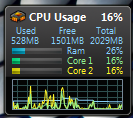
Here is my memory usage now:

CPU

With Vista I was at 50% without doing anything.

And here is something I’ve noticed in the newly installed Windows Live Writer:

WriterBug

I do have an idea about why it happens…

Thursday, May 28, 2009

Java slows down tab opening in IE8

Working on IE8 in Windows 7 RC, I've suddenly noticed today that when opening new tabs, it took IE8 a few seconds to display the tab. Needless to day, I was annoyed. I remembered I installed Java today for another program, so I've quickly disabled Java in IE8 Tools -> Internet Options -> Programs -> Manage Add-ons, and the problem went away. So if you notice the same issue, try doing the same!

Playing MKV or DivX using FFDShow in Windows 7

One of the main issues that I had with Windows 7, was playing MKV files. I've installed Haali Media Splitter and FFDshow. I've started playing an MKV file and noticed that they playback was choppy a bit. After further investigation I've noticed that the FFDShow video decoder doesn't appear in the tray, so I understood that FFDshow isn't used. I've searched for a solution for a couple of days. I've quickly learned that the problem is that Windows 7 comes with it's own codec for MKV, and even for DivX, and it doesn't let FFDShow take over, but it took me another day to get to the following solution.

A word of warning: The solution is involves renaming files in the Windows\System32 folder. It isn't an ideal solution, and can cause certain things not to work right. I assume that TV recordings using Media Center won't work, and DVD playback also wouldn't work. It may break other things as well, so I take no responsibility for this solution.

The main solution is posted here. However, besides renaming the following files:
MP4SDECD.DLL
MP43DECD.DLL
MPG4DECD.DLL

The ones above are needed to enable DivX to be decoded with FFDShow. I had to rename one more file to get FFDShow to play MKV files, and that's: msmpeg2vdec.dll

That's it, now MKVs play well, with FFDShow. Hope this post saves people some time finding the solution.

Friday, March 6, 2009

Safari 4 – my new default

After I wrote my last post in Windows Live Writer and published it, it opened up in Safari 4 Beta. Yep, it is now my default browser, so bye bye FF for now.

Monday, March 2, 2009

Safari 4 Beta experience

First, an apology to my faithful reader for not writing for so long. I’m under a lot of pressure at work, and have hardly any time for anything fun :-(.

As you may have gathered, I like betas, and I particularly enjoy Apple’s new Safari 4 Beta. As other reviews have stated, it’s a very fast browser (IMHO, faster than FF3), and the Top Pages, and Cover Flow features are pretty cool. So far I haven’t had a single crash (now they will begin probably), so it appears quite stable. As I wrote above, I don’t have much free time, so my experience with it wasn’t very long. I’ll be sure to keep you updated!

Tuesday, February 3, 2009

Windows 7 – IE 8 – Google Toolbar: Bad idea?

As I wrote before, Internet Explorer 8 on Windows 7 started hanging more than usual, and I had to forcefully shut it down too many times. Today, I’ve decided to disable the Google Toolbar. Since then, no crashes. Let’s see how it goes.

Wednesday, January 28, 2009

IE8 add-on needs IE8. In IE8

I’m using Internet Explorer 8 on Windows 7. I tried to install an add-on using the “Get More Add-ons” Window. IE8 insisted that I should download IE8 first. Don’t believe me? See for yourself:

ie8needsie8

Saturday, January 17, 2009

AVG doesn’t like Windows 7 games

I’ve noticed that when I search for games on the Start menu, the machine almost freezes. Further investigations have shown that both CPU cores reach 100%, and even more investigations showed that the problem is with avgrsx.exe, AVG Resident Shield service. Now I need to find a solution.

Update: It appears this is not a Windows 7 issue, but rather a general AVG issue. I’ve installed Avira Antivir instead.

Friday, January 16, 2009

IE8: The killer browser in Windows 7?

I'm a Firefox user. In last couple of years I have always thought that the various Internet Explorers were rather slow and heavy, and Internet Explorer 8 was no different. Today, I installed Firefox on Windows 7, and as usual, I've set Firefox as my default browser. However, after a few minutes I understood that one of the main features of Windows 7 isn't working with Firefox, and I set Internet Explorer 8 as my default browser.

If you've read anything about Windows 7, you probably know about the "Aero peek", the feature that enables you to easily browse between open windows of the same application. With Internet Explorer 8, each tab is treated is a separate Window, and so, it is easy to browse between tabs. This feature is not available with Firefox.

IEAeroPeek

The second feature, which is a great addition, is the download progress. When you download files, you see a progress bar on the IE icon in the task bar. That way, you don’t have to check the download window each time.

IEProgress

A third feature is that when a tab crashes, it doesn’t bring down the entire IE session. Only the tab crashes, and then restarts in the same location!

So, IE is now my default browser. The only thing I really miss is the spell checker.

My experience with Windows 7 so far

So, I've installed Windows 7 last night. I had to repartition my machine, so that I could dual boot with Vista. I repartitioned using Vista's Disk Management, which was quite easy.
The installation itself took about 20 minutes, which was very fast! My experience so far is very positive. I have played with it at work, but even with a few minutes of experience in day to day stuff, I already found out one cute UI improvement. When you download a file using IE, the IE icon on the new task bar turns partly green, to show the progress of the download. That way you don't have to check the download window to see how the download progresses. Here is how it looks like:

IEProgress

Anyway, I'll keep updating on my experience. Hope it will be positive all the way!

Thursday, January 15, 2009

I've installed Windows 7!

Partitioned my HD and installed Windows 7 side by side with Vista. Hope it goes well!