About a month ago I got the HTC Diamond Smartphone. After a month I can say that this is the best Smartphone I have ever had. First, for the battery issue that I had, I replaced the battery and the battery life is much better now (around a day and a half of moderate use). The best way to measure success is if it replaces my regular, old cellular phone, and my old phone is resting peacefully in the car for almost a month now! The phone is small and a perfect fit for the pocket. As a phone it works great, and I hardly missed a phone call (Smartphones tend to delay the ring), and it’s not too slow at all. I use it regularly for push-mail, and I haven’t had any hiccups at that end as well. While its camera is not that great, it is certainly enough for a phone. So bottom line, I wouldn’t mind keeping it for a while (that is, until the next hot gadget arrives!).
Friday, October 3, 2008


Friday, September 5, 2008
HTC Diamond
Just got this beautiful one from work:
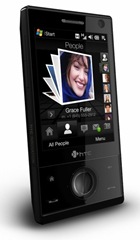
You can get all the details in the HTC website, but the quick and short details are that it's small, light, and has a cool 3D UI which IMHO gives iPhone a fair fight. Oh, and the telephony part is much better than my previous one, the Samsung Blackjack.
The downside is that it's a tad slow, and the battery life is not that great (probably a little more than a day, but mine is not a new device, as it's from work). I do however charge it during the day, when it's connected to my PC, and I also have a car charger, so it's not a problem so far.
The last issue is that it also takes time from the time the call comes in, to the time you hear the ring (2-3 missed rings), but this is the case with my previous Smartphone as well.
My recommendation? I think I'll wait a few days to decide. I only had it for about two days...
Saturday, August 9, 2008
Saitek X52 Joystick - the continuation
First, one thing I forgot about the software setup. This wonderful message appeard in the beginning:

"Setup will:" not work...
So, got a profile for Microsoft Flight Simulator X. Works great! probably have some more tweaking to do, but basically works very well with tons of buttons to configure.
Thursday, August 7, 2008
Saitek X52 Joystick - Setup
Following my last post about the X52, I finally got it today!

My first thought: it's big! They're big! They are taking a lot of space on my desk, and they are too high for comfort, but I will find a solution for that. So, I plugged them in, and the lit up like a Christmas tree. I've already downloaded the driver and software for Vista (I knew I should avoid the ones from the CD), so I setup the driver, which worked great. Next I ran the Profiler software setup... and nothing happened. I ran it again, and got a message that it was overwritten the same files, but nothing happened. After digging up in some forums I understood that the files were just being extracted, and the setup hasn't actually run (and this software is supposed to support Vista). I tried to find the folder where the setup was extracted to, but couldn't find it in Windows Explorer. I only got to it by opening an elevated command prompt, and navigating to c:\windows\temp, a folder which I couldn't get to in an elevated explorer! I copied the setup files to C, and got the software installed.
Next, I tried to load the profiles for IL2 and FSX that I've downloaded from Saitek's web site. Surprise surprise, they only had .dat files which are for the old software. The new software supports another format.
So basically, Saitek's Vista support really sucks!
Tomorrow my task would be to create profiles for IL2 and FSX.
Sunday, August 3, 2008
Saitek X52 Flight Control System
Saitek X52 Flight Control System
I purchased this after my previous Joystick started misbehaving. It looks pretty cool, with it being a throttle and stick combo. I hope to get it this week, and let you know how it goes.
Thursday, December 13, 2007
ASUS | Eee PC
I got a chance to check it out today, and it's pretty cool! It is a sub-notebook. On one hand, it's small and very light. On the other hand, it's big enough to work on. It runs on a Linux distribution, although you can install Windows XP on it as well. The UI is very simple, with large icons which are divided to different areas (Internet, Work, Play, etc.). It has quite a few applications pre-installed, and it also has WiFi.
Who is it good for? Good question! Kids, novice users who don't want a desktop, and so on. What about power users? Well, you're a bit limited with it. It's not very fast, so if you want to install a full-blown OS, with lots of utilities, it probably won't work so well. I tried to use the advanced mode, which gives you the KDE environment, but some dialogs were too large to display on the 7'' screen. There may be a way to change the screen resolution, but when it comes to Linux, I'm a novice.
But it's a great alternative if you travel a lot, and need only the basic applications. At 0.92kg, it beats any Notebook!

